
If you’ve ever visited a website and noticed the small padlock icon beside the URL, you’ve already interacted with SSL technology. Most people know SSL certificates protect websites, but far fewer understand the hidden system working behind the scenes: the SSL certificate chain.
And honestly, that’s where the real magic happens.
Without a properly configured SSL certificate chain, even a valid SSL certificate can fail. Your visitors may see browser warnings, your SEO rankings could suffer, and trust in your website might disappear almost instantly. In today’s internet landscape, where security and credibility matter more than ever, understanding what is an SSL certificate chain is no longer optional for website owners, developers, or digital marketers.
Whether you run a blog, an eCommerce store, or a business website, this guide will break everything down in plain English. No confusing jargon. No robotic explanations. Just practical knowledge you can actually use.
What Is an SSL Certificate Chain?
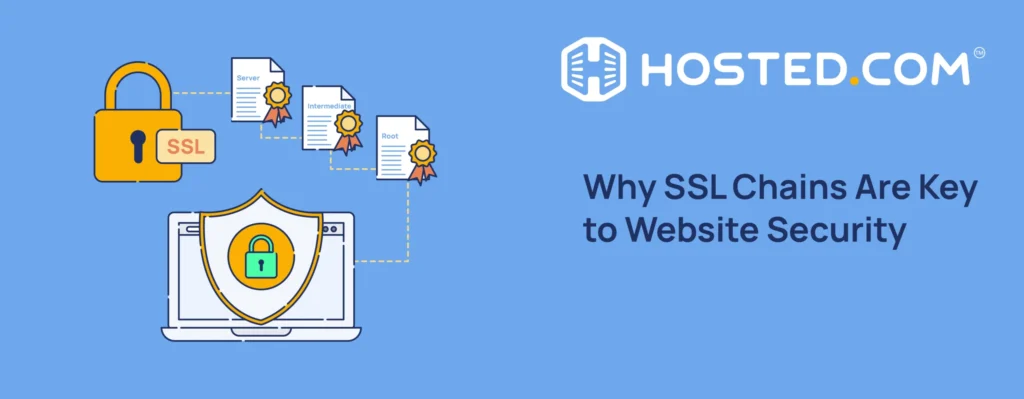
An SSL certificate chain is a sequence of digital certificates that establishes trust between a user’s browser and a secure website.
Think of it like a chain of identity verification.
Instead of a browser blindly trusting every website on the internet, it relies on trusted authorities to confirm that a website is authentic and secure. The SSL certificate chain connects your website certificate to a trusted root certificate authority through one or more intermediate certificates.
In simple terms, the SSL chain works like this:
- Your website presents an SSL certificate
- That certificate is verified by an intermediate certificate
- The intermediate certificate is verified by a root certificate authority
- The browser trusts the root authority
- Therefore, the browser trusts your website
That entire process happens in milliseconds whenever someone visits your site.
Why the SSL Certificate Chain Matters
A lot of website owners install an SSL certificate and assume the job is done. Unfortunately, that’s not always true.
A broken or incomplete SSL certificate chain can create major issues, including:
- Browser security warnings
- “Your connection is not private” errors
- HTTPS failures
- Reduced website trust
- Lower search engine rankings
- Failed API connections
- Email delivery problems
- Vulnerabilities to man-in-the-middle attacks
Google also considers HTTPS and secure browsing as ranking signals. So if your SSL certificate chain is misconfigured, your SEO performance can quietly suffer over time.
That’s why understanding what is an SSL certificate chain is so important for modern website management.
The Three Main Parts of an SSL Certificate Chain
To fully understand how SSL trust works, you need to know the three key components.
1. Root Certificate
The root certificate sits at the very top of the trust hierarchy.
These certificates are issued by trusted Certificate Authorities (CAs) like:
- DigiCert
- Sectigo
- GlobalSign
- Let’s Encrypt
- Comodo
Operating systems and web browsers already trust these root certificates by default.
Because root certificates are so sensitive, they’re rarely used directly to sign website certificates.
2. Intermediate Certificate
Intermediate certificates act as the bridge between the root certificate and the server certificate.
This extra layer improves security because it protects the root certificate from direct exposure.
Most SSL problems actually happen here. If the intermediate certificate is missing or incorrectly installed, browsers cannot complete the chain of trust.
3. Server Certificate
This is the certificate installed directly on your website server.
It contains:
- Your domain name
- Public encryption key
- Certificate expiration date
- Issuer information
- Organization details
When users connect to your website, this certificate is presented first.
How the SSL Certificate Chain Works
Let’s make this easier with a real-world analogy.
Imagine you apply for a passport.
- You show your ID to a government office
- The office is approved by the national government
- People trust the government
- Therefore, people trust your passport
The SSL certificate chain works in almost the same way.
Here’s the technical process:
| Step | What Happens |
|---|---|
| 1 | User visits an HTTPS website |
| 2 | Server sends SSL certificate |
| 3 | Browser checks intermediate certificates |
| 4 | Browser validates root certificate |
| 5 | Trust is established |
| 6 | Encrypted connection begins |
If any link in that chain breaks, the browser cannot verify the site’s authenticity.
What Happens If the SSL Certificate Chain Is Broken?
This is where many website owners run into trouble.
An incomplete SSL certificate chain usually causes browser trust errors. Some browsers may still allow access, while others completely block the website.
Common symptoms include:
Browser Warnings
Users may see messages like:
- “Connection not secure”
- “Certificate not trusted”
- “NET::ERR_CERT_AUTHORITY_INVALID”
- “SSL certificate problem”
These warnings scare visitors away immediately.
SEO Damage
Google prioritizes secure websites. A broken HTTPS configuration can hurt:
- Search rankings
- Organic traffic
- User trust metrics
- Bounce rates
Failed Mobile Compatibility
Older Android devices and outdated browsers often struggle with improperly configured certificate chains.
Payment Processing Issues
eCommerce websites can experience:
- Failed checkout pages
- Payment gateway errors
- API authentication failures
That’s a nightmare scenario for online businesses.
SSL Certificate Chain vs SSL Certificate
People often confuse these two concepts.
Here’s the difference:
| SSL Certificate | SSL Certificate Chain |
|---|---|
| Individual certificate for a domain | Full trust hierarchy |
| Installed on server | Includes intermediate and root certificates |
| Encrypts communication | Validates authenticity |
| One certificate | Multiple linked certificates |
So when people ask what is an SSL certificate chain, the answer goes beyond just the certificate itself. It’s the entire validation structure that allows browsers to trust your site.
Types of SSL Certificates Used in the Chain
Several certificate types may appear within an SSL certificate chain.
Domain Validated (DV) Certificates
These verify domain ownership only.
Best for:
- Blogs
- Small websites
- Personal projects
Organization Validated (OV) Certificates
These validate business identity alongside domain ownership.
Best for:
- Company websites
- Business portals
- Professional services
Extended Validation (EV) Certificates
These require extensive verification and offer the highest trust level.
Best for:
- Banks
- Financial institutions
- Large eCommerce stores
Wildcard Certificates
Protect a domain and all subdomains.
Example:
- example.com
- blog.example.com
- shop.example.com
Multi-Domain SSL Certificates
Secure multiple domains under one certificate.
Why Browsers Trust SSL Certificate Chains
Browsers maintain a trusted root store.
This store contains approved root certificate authorities. Whenever your website presents its certificate chain, the browser checks whether the chain leads back to one of these trusted roots.
Popular browsers that perform this validation include:
- Google Chrome
- Mozilla Firefox
- Microsoft Edge
- Safari
- Opera
Without a valid certificate chain, browsers simply refuse to trust the connection.
SSL Handshake and Certificate Chains
The SSL handshake is the process where encryption and trust are established between a browser and server.
Here’s how the SSL certificate chain fits into that process:
- Browser requests secure connection
- Server sends SSL certificate chain
- Browser validates certificates
- Encryption keys are exchanged
- Secure HTTPS session begins
This happens almost instantly, yet it’s one of the most important security mechanisms on the web.
Common SSL Certificate Chain Errors
Even experienced developers sometimes make mistakes.
Here are the most common SSL chain issues.
Missing Intermediate Certificate
Probably the most frequent problem.
The server certificate is installed, but the intermediate certificate is missing.
Result:
- Browsers cannot establish trust
Incorrect Certificate Order
Certificates must appear in the correct sequence.
Wrong ordering can break validation.
Expired Certificates
Certificates have expiration dates.
An expired intermediate certificate can invalidate the entire chain.
Self-Signed Certificates
These are not trusted publicly because they bypass recognized certificate authorities.
Mixed Content Errors
A secure HTTPS page loads insecure HTTP resources.
This weakens overall website security.
How to Check an SSL Certificate Chain
Thankfully, checking your SSL chain is fairly simple.
You can use:
- Browser certificate inspection
- SSL checker tools
- OpenSSL commands
- Online SSL testing platforms
Things to verify:
- Certificate validity
- Intermediate certificates
- Expiration dates
- HTTPS configuration
- Root authority trust
Regular SSL monitoring is extremely important for website maintenance.
SSL Certificate Chain and SEO
This topic doesn’t get enough attention.
A secure HTTPS environment contributes to:
- Better user trust
- Improved rankings
- Reduced bounce rates
- Enhanced page experience signals
Google has openly stated that HTTPS is a ranking factor.
An improperly configured SSL certificate chain can indirectly affect SEO because users abandon insecure websites quickly.
Trust and rankings often go hand in hand.
SSL Certificate Chain for eCommerce Websites
If you run an online store, this matters even more.
Customers enter:
- Credit card information
- Addresses
- Passwords
- Payment details
Without a valid SSL certificate chain, shoppers may abandon carts immediately.
Security directly impacts conversion rates.
In competitive online markets, even small trust issues can cost thousands in lost revenue.
How to Install an SSL Certificate Chain Properly
The installation process depends on your hosting environment.
However, the general steps usually include:
Step 1: Generate a CSR
CSR stands for Certificate Signing Request.
Step 2: Receive Certificates From CA
You’ll usually receive:
- Server certificate
- Intermediate certificate bundle
Step 3: Install Certificates
Upload them to:
- Apache
- Nginx
- IIS
- cPanel
- Cloud hosting platforms
Step 4: Configure HTTPS
Ensure:
- Full certificate chain is included
- Redirects work properly
- TLS settings are updated
Step 5: Test the Installation
Always verify using SSL testing tools.
SSL Certificate Chain Best Practices
Want fewer SSL headaches? Follow these best practices.
Use Reputable Certificate Authorities
Stick with trusted providers.
Renew Certificates Early
Never wait until the expiration date.
Monitor Expiry Dates
Automated alerts help avoid downtime.
Enable Modern TLS Versions
Older protocols create security risks.
Use Full Chain Certificates
Always install intermediate certificates correctly.
Test Across Devices
Different browsers behave differently.
SSL Certificate Chain and Website Performance
Many people assume SSL slows websites down.
That was somewhat true years ago.
Today, modern HTTPS and TLS configurations are highly optimized. In fact, secure websites often perform better because:
- HTTP/2 requires HTTPS
- Browsers prioritize secure connections
- CDNs optimize encrypted traffic
A properly configured SSL certificate chain actually supports better performance and reliability.
The Role of Certificate Authorities
Certificate Authorities play a huge role in internet trust.
They:
- Issue certificates
- Validate ownership
- Maintain security standards
- Revoke compromised certificates
Without trusted certificate authorities, secure web browsing simply wouldn’t work.
Why SSL Certificate Chains Matter More Than Ever
Cybersecurity threats continue to grow every year.
Attackers constantly attempt:
- Data interception
- Phishing
- Session hijacking
- Identity theft
A valid SSL certificate chain helps protect users against these risks by ensuring encrypted and authenticated communication.
In today’s environment, website trust is everything.
People notice security warnings instantly.
And once trust disappears, getting it back becomes much harder.
Final Thoughts
Understanding what is an SSL certificate chain can completely change how you think about website security.
It’s not just a technical detail hidden behind HTTPS. It’s the foundation of online trust. Every secure website depends on a properly functioning certificate chain to validate authenticity, protect user data, and maintain browser confidence.
Whether you run a personal blog, business website, SaaS platform, or online store, your SSL certificate chain directly affects:
- Security
- SEO rankings
- User trust
- Conversion rates
- Browser compatibility
Ignoring SSL configuration is risky. Fortunately, once you understand how the chain works, managing it becomes far less intimidating.
If you found this guide helpful, consider sharing it with other website owners or developers who still struggle with SSL errors and HTTPS setup. The more people understand SSL certificate chains, the safer the web becomes for everyone.