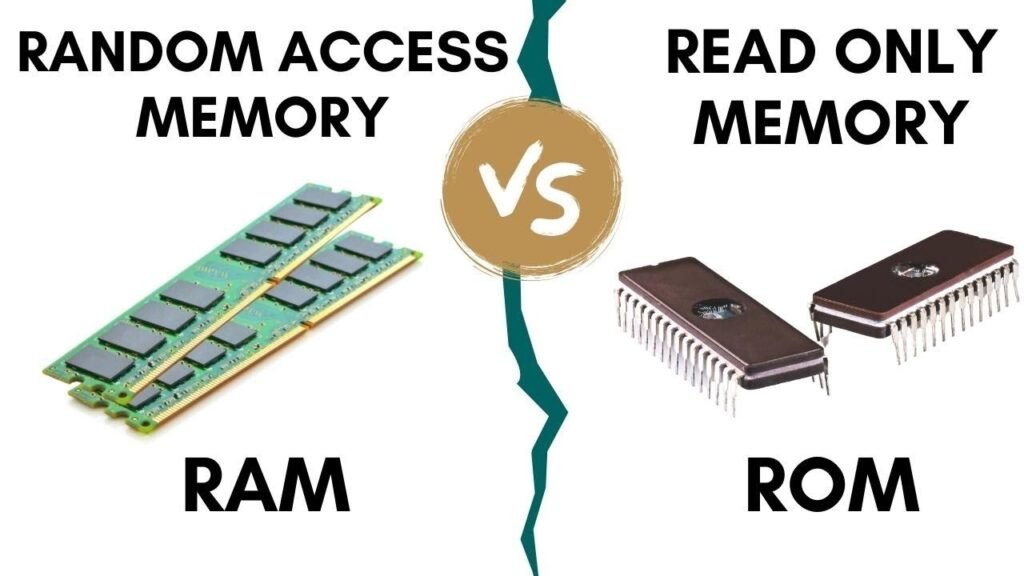

When people start learning about computers, one of the first concepts they encounter is the difference between RAM and ROM. Although these two types of memory are fundamental components of every computer, smartphone, tablet, and electronic device, many people still confuse them.
At first glance, RAM and ROM may seem similar because both are forms of memory used in a computer system. However, their purposes, functionality, storage capabilities, and performance characteristics are completely different.
Understanding the difference between RAM and ROM is important not only for students and IT professionals but also for everyday users who want to make informed decisions when purchasing or upgrading devices. Whether you’re buying a laptop, troubleshooting a slow computer, or simply expanding your technical knowledge, knowing how RAM and ROM work can help you better understand modern technology.
In this comprehensive guide, we’ll break down everything you need to know about RAM and ROM in a simple and easy-to-understand way.
What Is RAM?
RAM stands for Random Access Memory. It is the temporary memory of a computer that stores data and instructions currently being used by the processor.
Think of RAM as your desk while working. The larger your desk, the more documents and tools you can keep accessible at the same time. Similarly, the more RAM your computer has, the more applications it can run efficiently.
Key Characteristics of RAM
- Volatile memory
- Temporary data storage
- High-speed data access
- Supports multitasking
- Directly accessed by the CPU
- Data is lost when power is turned off
For example, when you open a web browser, edit a document, or play a game, the required data is loaded into RAM so the processor can access it quickly.
Types of RAM
DRAM (Dynamic Random Access Memory)
DRAM is the most common type of RAM used in computers. It continuously refreshes stored data to maintain information.
SRAM (Static Random Access Memory)
SRAM is faster than DRAM but more expensive. It is commonly used in CPU cache memory.
SDRAM (Synchronous Dynamic RAM)
SDRAM synchronizes with the system clock, improving performance and efficiency.
DDR RAM
Modern computers primarily use DDR memory variants, including:
- DDR3
- DDR4
- DDR5
Each generation offers better speed, bandwidth, and energy efficiency.
What Is ROM?
ROM stands for Read-Only Memory. Unlike RAM, ROM is permanent memory that stores essential instructions required for device startup and operation.
You can think of ROM as a built-in instruction manual that remains available even when the device is powered off.
Key Characteristics of ROM
- Non-volatile memory
- Permanent data storage
- Retains data without electricity
- Contains firmware and boot instructions
- Generally slower than RAM
- Data is rarely modified
ROM stores critical information such as BIOS, firmware, and startup programs that help a computer boot successfully.
Types of ROM
PROM (Programmable Read-Only Memory)
PROM can be programmed once after manufacturing.
EPROM (Erasable Programmable Read-Only Memory)
EPROM can be erased using ultraviolet light and reprogrammed.
EEPROM (Electrically Erasable Programmable Read-Only Memory)
EEPROM allows electrical erasure and reprogramming without removing the chip.
Flash Memory
Flash memory is a modern version of EEPROM widely used in USB drives, SSDs, smartphones, and embedded systems.
Difference Between RAM and ROM
The easiest way to understand the difference between RAM and ROM is to compare their core functions.
| Feature | RAM | ROM |
|---|---|---|
| Full Form | Random Access Memory | Read-Only Memory |
| Storage Type | Temporary | Permanent |
| Volatility | Volatile | Non-Volatile |
| Speed | Very Fast | Slower |
| Data Retention | Lost when power is off | Retained without power |
| Purpose | Active processing | Boot and startup instructions |
| Modification | Frequently modified | Rarely modified |
| Capacity | Usually larger | Usually smaller |
| Cost Per GB | Higher | Lower |
| CPU Access | Constant | Limited |
This table clearly highlights the primary difference between RAM and ROM and shows why both are necessary for computer operation.
Why Is RAM Important?
RAM plays a vital role in overall system performance.
When a computer lacks sufficient RAM, it struggles to handle multiple tasks efficiently. Applications may freeze, loading times increase, and the system becomes sluggish.
Benefits of More RAM
- Faster application loading
- Improved multitasking
- Better gaming performance
- Smoother video editing
- Enhanced productivity
- Reduced system lag
For example, a computer with 16GB RAM typically performs much better than one with 4GB RAM when running multiple programs simultaneously.
Why Is ROM Important?
ROM is equally essential because it contains the instructions needed to start the system.
Without ROM, a computer would not know how to initialize hardware components or load the operating system.
Functions of ROM
- Stores firmware
- Contains BIOS instructions
- Initializes hardware
- Supports system startup
- Maintains device functionality
Every smartphone, gaming console, router, and computer relies on ROM to operate correctly.
How RAM and ROM Work Together
Although the difference between RAM and ROM is significant, both memory types work together seamlessly.
Here’s what happens when you turn on a computer:
- ROM provides startup instructions.
- BIOS or firmware initializes hardware.
- Operating system loads from storage.
- Required files move into RAM.
- CPU processes data from RAM.
This cooperation allows devices to boot quickly and run applications efficiently.
Real-Life Example of RAM and ROM
Imagine you’re preparing a meal.
ROM Is the Recipe Book
The recipe book contains permanent instructions that don’t change often.
RAM Is the Kitchen Counter
The kitchen counter is where ingredients are actively used during cooking.
Once cooking is finished, the ingredients are cleared from the counter, but the recipe remains in the book.
This simple analogy perfectly explains the difference between RAM and ROM.
RAM vs ROM in Smartphones
Smartphone buyers often see specifications mentioning RAM and storage.
Many people mistakenly assume phone storage is RAM, but they are different.
Smartphone RAM
Used for:
- Running apps
- Multitasking
- Background processes
- Gaming performance
Smartphone ROM
Often marketed as internal storage and used for:
- Operating system files
- Photos
- Videos
- Applications
- Documents
Understanding this distinction helps consumers choose devices that match their needs.
Conclusion
Understanding the difference between RAM and ROM is fundamental for anyone using modern technology. While RAM serves as temporary working memory that helps applications run smoothly, ROM acts as permanent storage for critical startup instructions and firmware.
In simple terms, RAM focuses on speed and active processing, whereas ROM focuses on stability and long-term data retention. Both memory types perform unique functions that complement each other, making modern computers, smartphones, gaming consoles, and embedded systems possible.